
Emergence de l'idée
Plus de détails sur le concept
Travail effectué
Ether
Solo project | 1 person | ~1 month
Context
Ether is a "game" made for a programming exercise.
This project was carried out entirely alone.
In reality, it’s a concept I had noted for some time and it was an opportunity.
Emergence of the idea
Being in a period of rogue-like discovery, the concepts I created at that time were mostly rogue-like, and Ether is one of them.
It’s the mix of a rogue-like and a mode I’ve been in for quite some time, the PVE against zombies, more precisely that of Call of Duty.
I wanted to test the mix between zombie mode, which I really like, and a genre that I enjoy just as much.
More details about the concept
The player must defend against waves of zombies. The player can decide when to start a new round and at the end of the 10th round, a boss appears, allowing him to have a rare item as well as move to a new room.
Over the eliminations, the player receives money; he can spend this money on several things:
- A random Item
- A random power (player’s active)
- Of life (not max health but just health)
He also gets a random free item every 5 rounds.
The player can change weapons if they manage to get more, but they can only have one weapon on them.
Other elements are also present
- Secret rooms
- Jokers
- Traps
Work done
Game Design
Secret rooms
Secret rooms are available in round 3 and round 6.
So 3 doors appear; only one is the real one allowing access to a room containing the reward.
If the player does not choose a door in round 3, only the real one appears in round 6.
Several contents are available:
- 2 Items
- 2 Power
- 2 Weapon
- 1 Item, 1 Power, 1 Weapon
- 1 Item that changes all the Xs.
Each point is a room iteration and the player must choose only 1 element; once taken, the others/the other one disappears.
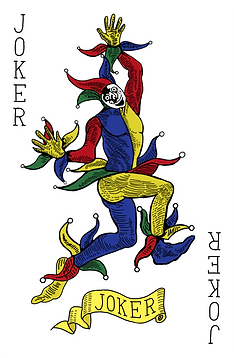
Jokers
Jokers are cards that are given to us when we obtain [X] number of Item in a category.
The goal of Jokers is to "break" the game even more than objects.
Item categories are present only on objects with major changes.
Major-change items are items that trigger an effect at a time X; it’s not just an object that changes the player’s statistics, it’s an item that has an effect on the player’s actions.
Like healing him when he kills an enemy, making an explosion during reloading etc...
Traps
In the room, different traps can be present, they are paid but offer the player unique effects to kill enemies easily.
Programmation
Here is the list of concepts I worked on:
- States Machines
- Delegates
- Interfaces
- ScriptableObject
- Coroutines
- Dev Tools
- Animator
- Cinemachine
States Machines, Animator & Cinemachine
During the creation of the game, I was learning State Machines, so I implemented State Machines in order to practice them. I kept some rather simple states:
- IdleState
- LocomotionState
- Jump State
Animations are played out when the player enters a new state, so I ran a 3D model on those states.
Also, I used the Cinemachine to make an FPS camera.
Delegates
I had already done a few tests on the Delegates before the project, but it is on this project that I have a rather advanced functioning of the Delegates.
I used Delegates for everything that item triggers , here is the list:
Player
- playerShoot
- playerReload
- playerBulletDestroyed
- playerDealDamage
- playerKill
- playerTakeDamage
- PowerActivation
- ObtainItem
- BuyRegenLife
- BuyBox
Game
- GenerateRoom
- EnterRoom
- EndRoom
- Begin Round
- EndRound
- EnterSecretRoom
- FailSecretRoom
- ExitSecretRoom
Interfaces
I discovered the interfaces at the same time as States Machines, however unlike States Machines they are much easier to use.
In this project, their main use was for interactive elements, giving them the IInteract interface, allowing any interactive Item to implement an empty interaction function that I filled out according to the needs of the interactive object.
ScriptableObject
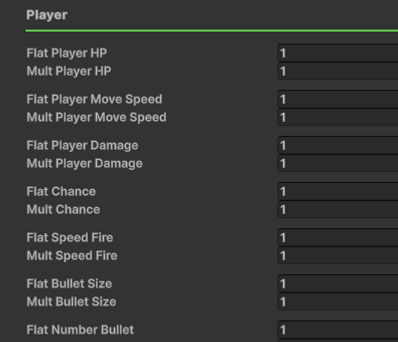
Having quite a few numbers to manage, I passed the values of the objects into ScriptableObject; it’s much easier to change its values later but also to manage all the variables. Here are the settings:
- Item Name
- Icon
- Rarity
- Category
- Description
- [All the other Floats changing the game’s stats]
Like all rogue-like games, a lot of values are modifiable, influencing the game


Dev Tools
I spent quite a bit of time making things easier for myself, here are some tools I created:
Quick Object Creations

Simple shortcut to be able to create object ScriptableObjects.
Quick Choice of when to trigger the Object
This allowed me to choose in which Delegates the object was going quite easily from the inspector.

Similar functions

In case I had similar functions, I could directly choose the related function.
No more need for case-by-case operation of objects.
I was just setting the function and it assigned the function at the moment (Delegates) and as soon as the Delegates was triggered, the function started